
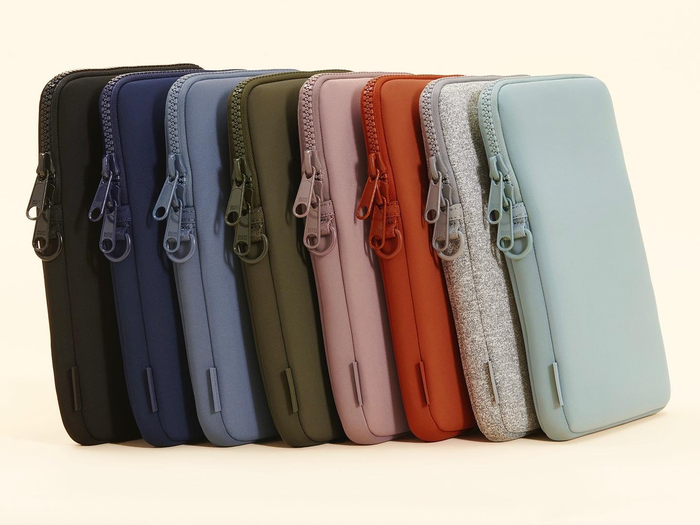
A laptop is an important part of everyday life for students, professionals, remote workers, and frequent travelers. Whether commuting to work, attending classes, or working from different locations, keeping a laptop protected during transportation is essential. Choosing the right carrying accessory can help reduce exposure to scratches, minor impacts, dust, and everyday handling.
A Neoprene Laptop Bag is a popular option because of its flexible construction, soft texture, and lightweight feel. However, not every design provides the same level of convenience or protection. Understanding factors such as size, padding, closure quality, storage capacity, and carrying comfort can help you select a bag that suits your device and daily routine.
Why Neoprene Is Used for Laptop Bags
Neoprene is a flexible synthetic rubber material commonly used in protective accessories. Its soft, cushioned structure makes it suitable for laptop sleeves and bags designed to help protect electronic devices during everyday transportation.
The material also offers several practical characteristics:
- Flexibility: It can accommodate different bag shapes and laptop dimensions.
- Cushioning: Its structure provides a layer of padding around the device.
- Lightweight feel: It adds relatively little weight compared with some rigid carrying cases.
- Soft texture: It helps reduce direct contact between the laptop and rough surfaces.
- Moisture resistance: It can offer some resistance to light splashes, depending on construction.
These qualities make neoprene a useful material, although the actual protection depends on the bag’s thickness, design, and overall build quality.
1. Choose the Correct Laptop Size
Size is one of the most important considerations when buying a laptop bag. A bag that is too small may put pressure on the device, while an oversized design can allow the laptop to move around during transportation.
Before purchasing, check your laptop’s actual dimensions rather than relying only on its screen size. Screen measurements do not include the full width, depth, and thickness of the device.
Consider the following details:
- Laptop width and height
- Device thickness
- Space required for protective padding
- Internal compartment dimensions
- Whether additional accessories will be carried
A properly fitted bag should hold the laptop securely without making insertion or removal difficult.
2. Evaluate Padding and Cushioning
Reliable everyday protection depends partly on the amount and quality of padding surrounding the laptop.
Neoprene naturally provides a cushioned structure, but different bags use different material thicknesses and construction methods. Thicker padding may offer additional cushioning, although it can also make the bag bulkier.
Check whether the bottom, corners, and sides have sufficient protection. These areas can be particularly vulnerable when a bag is placed on hard surfaces or moved between locations.
For people who commute frequently, additional corner reinforcement or a dedicated padded compartment may be worth considering.
3. Check the Closure and Zipper Quality
A secure closure helps prevent the laptop from slipping out of the bag during movement.
Zippers are commonly used in laptop bags, but their quality can vary. A poorly constructed zipper may become difficult to operate or fail with repeated use.
Look for smooth zipper movement, secure stitching around the closure, and durable zipper pulls. The opening should also be wide enough to allow easy access without placing unnecessary pressure on the laptop.
Some sleeve designs use alternative closures, so evaluate whether the selected system keeps the device securely in place.
4. Consider Storage and Organization
Many users carry more than just a laptop. Chargers, cables, notebooks, pens, and other accessories may also need storage.
A bag with additional compartments can help keep these items organized. However, the number of pockets should match your actual requirements.
Useful storage features may include:
- A dedicated laptop compartment
- A pocket for charging cables and adapters
- Small sections for pens or accessories
- A document pocket for notebooks and papers
- Secure compartments for personal items
Avoid placing heavy or sharp accessories directly against the laptop unless they are separated by suitable padding.
5. Select a Comfortable Carrying Style
The right carrying style depends on how you normally transport your laptop.
Laptop Sleeve
A sleeve is a compact option for people who already use a backpack, briefcase, or larger travel bag. It provides a protective layer around the device without adding unnecessary storage space.
Handle Laptop Bag
A design with comfortable handles may be suitable for professionals who prefer carrying their laptop separately during short commutes or office visits.
Shoulder Laptop Bag
An adjustable shoulder strap offers hands-free carrying and can be useful when traveling between meetings, classes, or workplaces.
When comparing these options, check handle attachment points, strap adjustment, padding, and overall weight distribution.
6. Look for Durable Stitching and Construction
Material quality alone does not determine how long a laptop bag will last. Construction details also play an important role.
Inspect the seams, corners, zipper attachments, handles, and strap connections. Consistent stitching and reinforced stress points can help the bag withstand regular handling.
The bag should maintain its shape without excessive stretching or loose sections. A well-constructed design is more likely to remain functional through daily commuting and repeated use.
7. Understand the Limits of Water Resistance
Neoprene can provide some resistance to moisture, making it useful in environments where occasional splashes or light dampness are possible.
However, not every neoprene laptop bag is waterproof. Water can enter through zippers, seams, openings, and other exposed areas.
If you regularly travel in rainy conditions, check whether the product includes additional water-resistant construction. For valuable electronics, a separate waterproof cover may provide extra protection when necessary.
8. Match the Design to Your Daily Routine
A laptop bag should suit both your device and the way you use it.
For office professionals: A streamlined design with a dedicated laptop compartment and space for documents may be appropriate.
For students: Additional pockets for notebooks, stationery, and charging accessories can make daily organization easier.
For remote workers: A lightweight bag with practical storage can simplify movement between home, cafés, and shared workspaces.
For frequent travelers: Secure closures, comfortable carrying options, and a compact shape can be particularly useful when moving through airports or transportation hubs.
Thinking about your regular activities can help you avoid choosing a bag based only on its appearance.
Common Mistakes to Avoid When Buying a Neoprene Laptop Bag
A few purchasing mistakes can reduce the usefulness of an otherwise attractive laptop bag.
- Ignoring actual laptop dimensions: Always compare internal measurements with your device.
- Choosing based only on appearance: Consider construction quality and practical features.
- Overlooking corner protection: Check whether vulnerable areas receive sufficient cushioning.
- Assuming all neoprene bags are waterproof: Review the product’s actual moisture-protection specifications.
- Selecting unnecessary storage: Extra pockets can add bulk without improving usability.
- Ignoring carrying comfort: Handles and shoulder straps should suit your daily transportation needs.
Taking time to evaluate these details can help you make a more informed purchase.
Tips for Maintaining Your Laptop Bag
Regular care can help preserve the appearance and functionality of a neoprene laptop bag.
- Remove dust and loose dirt with a soft cloth.
- Follow the manufacturer’s cleaning instructions for stains.
- Avoid harsh chemicals that may damage the material.
- Allow the bag to dry completely before storing it.
- Keep sharp objects away from the inner compartment.
- Check zippers, seams, and handles for signs of wear.
- Avoid overloading pockets with heavy accessories.
It is also advisable to remove the laptop before cleaning the bag and to make sure the interior is completely dry before using it again.
Conclusion
Choosing a neoprene laptop bag requires more than selecting an attractive design. The right option should fit your device properly, provide suitable cushioning, include reliable closures, and offer a comfortable carrying experience.
By evaluating material quality, padding, storage compartments, stitching, and moisture resistance, you can find a bag that supports your everyday requirements. A carefully selected laptop bag can make commuting, studying, and traveling more convenient while providing an additional layer of protection for your electronic device.